
Getting found is half the job. Pulse does the other half.
Cite-Met Pulse is a website visitor identification and lead-capture platform. cite-met gets you cited in ChatGPT and Perplexity and ranking in Google — real, qualified traffic to your site. Then what? For most businesses the answer is nothing you can see. Analytics tells you “412 sessions” and a bounce rate. It can't tell you that Bloor West Dental Group read your pricing page twice this week, or that a returning visitor from a law firm just hit /contact.
Pulse closes that loop: found → identified → captured → booked. Every visitor becomes a row in a searchable roster — company, name, email, location, and how many times they've been back. The traffic report becomes a lead list.
1. Know exactly who's on your site
Not “a visitor” — a named company and person.
Every person who lands on your site becomes a row in one searchable roster — anonymous and known — with the company, name, email, location, and visit count. Corporate visitors resolve to their organization automatically; form-fills and tracked link clicks resolve to the person. “412 sessions” becomes “Bloor West Dental Group, Beaverbrook Builders, Northgate Dental — here's who to follow up with.”
Company resolved
Corporate traffic mapped to the organization behind it, automatically
Person resolved
Name and email attached the moment they fill a form or open a share link
One roster
Everyone who ever visited, searchable, with return-visit cadence
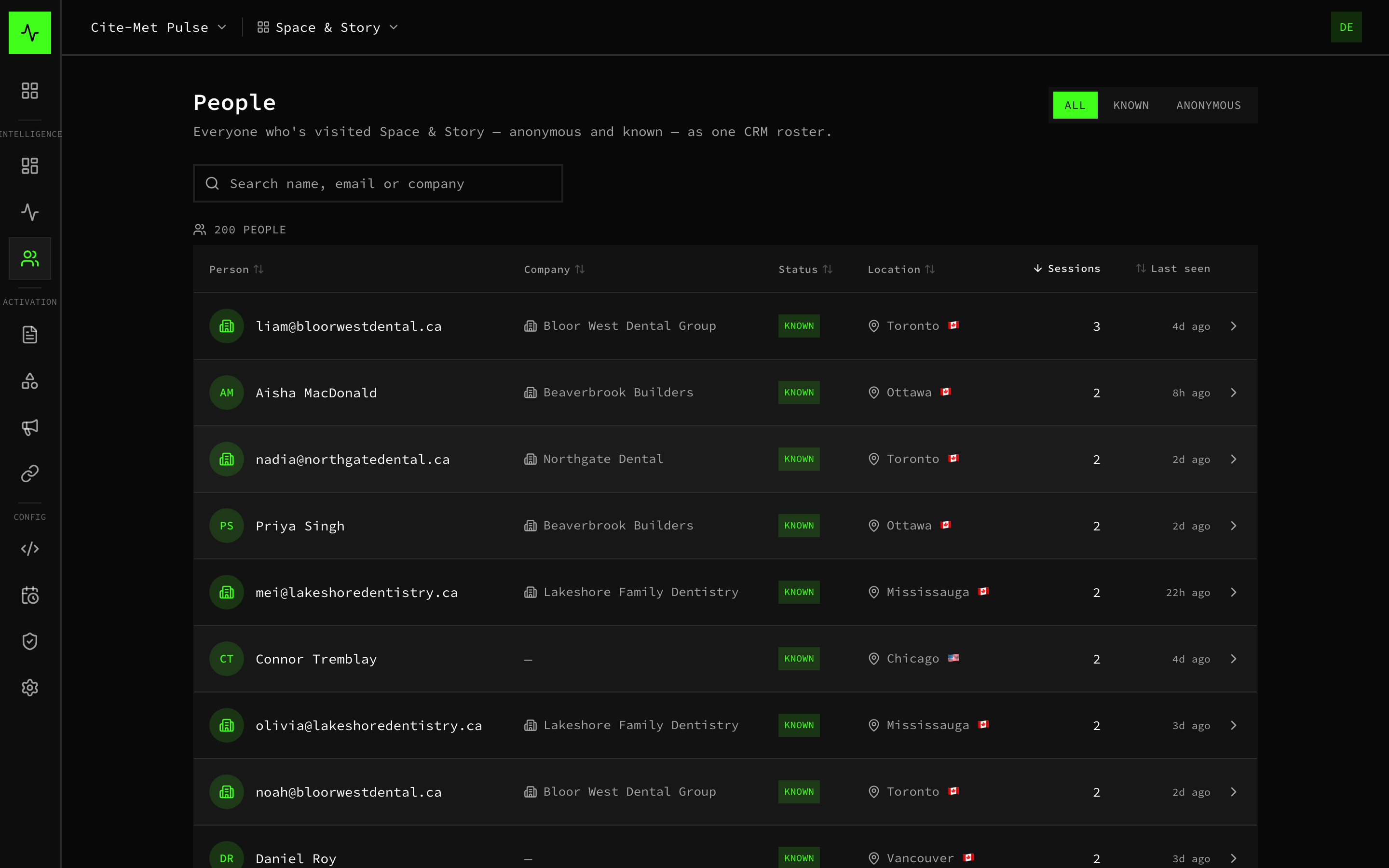
One CRM roster of everyone who visited (example data)
2. See the whole story behind a lead
Every sales conversation starts warm.
Click any person and you get their full picture: the company they belong to and how we know it, their visit cadence, total engaged time, behavioral tags like pricing-shopper or returning company, and every journey they've taken through your site, page by page. You already know they're a returning dental group that keeps checking pricing — you're not guessing.
Identity + source
Who they are and exactly how we know — corporate IP, form fill, or share link
Behavior tags
Pricing-shopper, returning company, and cadence — intent you can read at a glance
Full journey history
Every visit, every page, in order — the whole path they took to you

Identity, cadence, behavior tags, and full journey history (example data)
3. Watch the journey, entry to outcome
Learn which content earns leads — and which leaks them.
An aggregate flow of how visitors move through your site: where they enter (which blog post, which AI-search landing page), what they browse, their intent (pricing, comparisons, solutions), and the outcome (audit request, contact, or left). Identified traffic is highlighted so you can see which content actually pulls real leads toward conversion — and we tune your content and on-site offers accordingly.

Sankey flow from entry to outcome, identified vs anonymous (example data)
4. A real-time pulse of your site
Watch demand happen — and the identity layer work, live.
A live dashboard of today's traffic: who's on the site right now (which page, which city), the identified-vs-anonymous split over time, and a running feed of who just got identified and how. You can literally watch a share link open or a form fill resolve a visitor into a named lead as it happens.

Traffic trend, live-now, and recently-identified feed (example data)
5. Capture the lead — forms and booking, built in
Identified visitors don't just get counted. They get booked.
Flexible forms (any fields you want) and a built-in meeting booker run inside the same one-line embed — no separate form tool, no dev work. Every submission ties straight to the person and their journey, and lands in your inbox and the roster. You can also drop a standalone form onto any page.
Forms + booker
Capture and schedule inside the same one-line embed — no extra tools
Tied to the journey
Every submission links to the person and the full path that got them there
Feeds your CRM
Named, enriched leads hand off to the CRM you already run
Managed across your whole book
We run Pulse for every client from one console — spotting in-market accounts, tuning content by what actually converts, and proving the work, week after week.

Every client site's visitors, people, companies and conversions in one view (example data)
Why it's different
Most tools do one piece — de-anonymize, or analyze sessions, or book a call. Pulse does the whole loop, on first-party data.
| Capability | Cite-Met Pulse | Google Analytics | RB2B / Leadfeeder | Intercom / Qualified |
|---|---|---|---|---|
| Shows who (company + person) | Anonymous | Company only | Partial | |
| Full per-visitor journey | ||||
| Captures leads (forms + booking) | ||||
| Data held in a database we run for you | Google's | Their cloud | Their cloud | |
| No AI black box, rule-based | — | — | AI-first | |
| Included in your plan | — | $100s/mo | $$$$ |
Three things worth saying out loud
You own your leads
It runs on infrastructure we manage for you on Cloudflare. Your visitor data and leads live in a database we run for you, not in a separate de-anonymization vendor's cloud, and they are never sold or fed to an AI model.
No AI black box
Pulse runs on plain rules, not an AI model. Company matches come from the visitor's IP address, so accuracy varies, and each lead shows how it was identified.
Zero lift for you
One line of code, and we install and run the whole thing. You just watch the leads show up.
On the Growth and Authority plans, Cite-Met Pulse is included.
A visitor-intelligence and lead-capture platform that shows you every visitor, resolves the companies and people behind your traffic, maps their journeys, and captures them as booked leads, set up and managed for you, on first-party data. Pulse is part of the cite-met umbrella platform and is not available on the Local plan.
Switching from another tool?
See how Pulse compares to the de-anonymization tools teams usually start with — honest, side-by-side.